Every small business has a folder of product photographs and a nagging sense that none of them are quite right.
The stock was photographed on a kitchen table because that is where the light was. The background has a radiator in it. Half the range was shot in summer and half in winter, so the colours do not match. The marketplace wants a plain white background and every photograph has a worktop in it.
None of that is a failure of effort. Somebody took the time to photograph everything, in the conditions available, with the equipment to hand. The gap is between a photograph that shows the product and one that sells it on a listing page, and those turn out to be different objects.
Nano Banana with precise editing workflows through Higgsfield, Google’s image model family, is unusually suited to closing that gap, because its strength is changing part of an existing photograph while leaving everything else exactly as it was.
What photographs does a small business already have?
More than the owner thinks, scattered across more places than they would like.
Product shots taken for a listing, usually in a hurry when stock arrived. Photographs of the premises, the workshop or the stall. Images of work in progress taken because it looked good at the time. Pictures of stock taken for insurance or for a supplier. Shots of packaging, of the display, of a delivery.
Some of it is on a phone, some in a marketplace account, some in a messaging app where it was sent to somebody and never retrieved.
The useful realisation is that this material is mostly fine as a Nano Banana starting point. The product is in focus, the colour is roughly right, and the thing is recognisable. What is wrong with it is the context, and context is the part that can be changed afterwards.
Why do they fail on a listing page?
Four reasons, and none of them is that the product looks bad.
The background competes. A radiator, a worktop, a cable, somebody’s mug. The eye goes to whatever is unexpected, which on a product listing is everything except the product.
The light is inconsistent. Photographed across several sessions in different rooms at different times of year, a range that should look coherent looks assembled.
The shapes are wrong. A marketplace wants a square. A website is wide. A social post wants tall. One photograph cropped three ways loses something each time.
And the colour drifts. Phones adjust white balance to the room, so the same item photographed in a kitchen and in a hallway arrives as two slightly different products.
Any one of those is survivable. All four together produce a listing that looks like somebody selling from home, which is fine if that is the proposition and costly if it is not.
What does a marketplace actually want?
Something quite specific, and it is worth knowing before editing anything.
A plain background on the main image, usually white or near white, is the standard requirement across most major marketplaces. It exists so that a results page looks coherent, and listings that ignore it look wrong next to everything else even where the rule is not enforced.
The product fills most of the frame, rather than sitting small in the middle of a large image.
No text, badges or borders on the primary image, since those are frequently prohibited and always look like a workaround.
Additional images showing scale, detail and the product in use, where the plain background rule usually relaxes.
And consistent presentation across the range, so a customer browsing a seller’s other items sees a shop rather than a collection.
That list is achievable from existing photographs with Nano Banana. It is not achievable by reshooting everything, which is why most small sellers never get there.
What does Nano Banana change about an existing photo?
The surroundings, while leaving the product itself untouched.
This is the specific capability worth understanding. Nano Banana is built for editing rather than generating, and its defining behaviour is preserving everything an instruction did not mention. Ask for the background to become a plain white surface and the product keeps its exact shape, colour, texture and detail.
The practical operations that matter here:
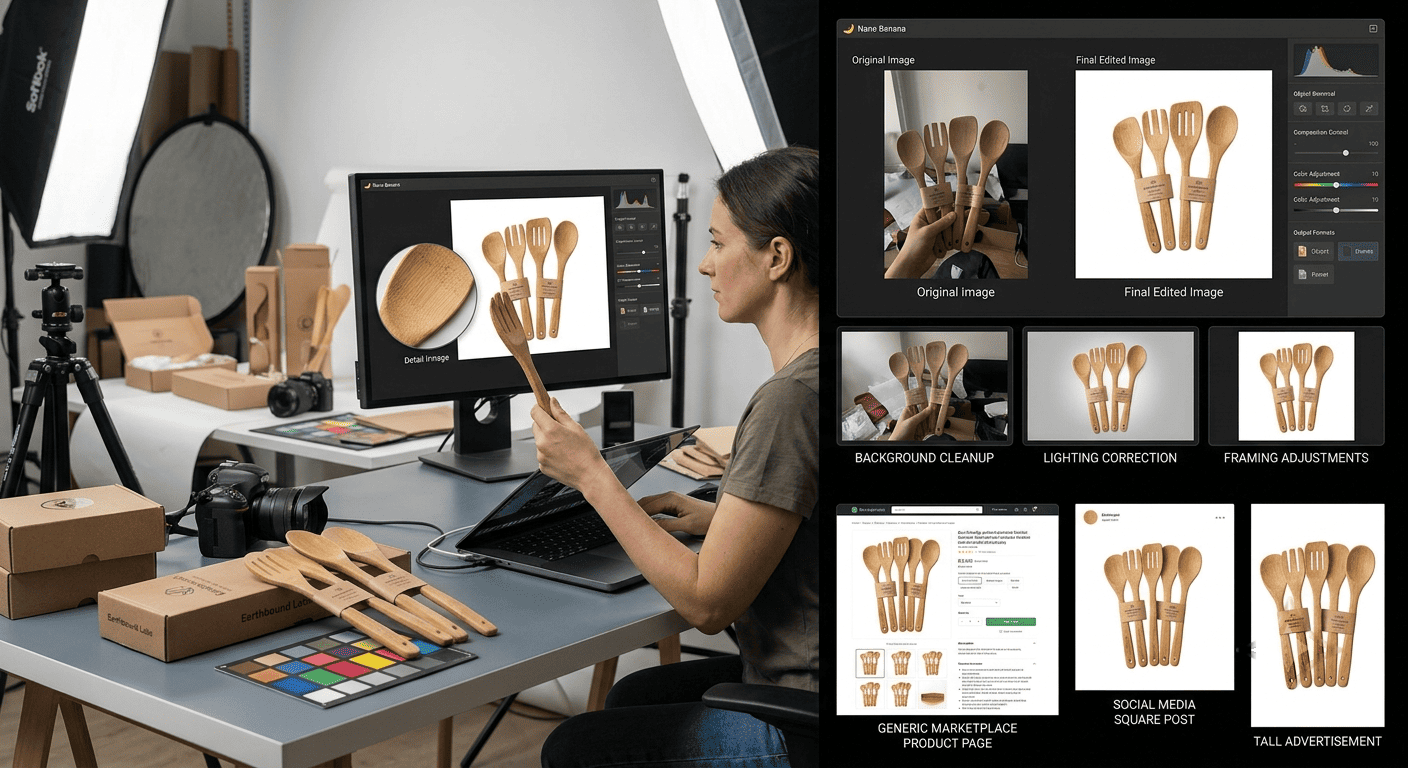
Background replacement in Nano Banana, turning a kitchen table into the plain surface a marketplace expects.
Removing incidental objects that wandered into frame, which Nano Banana handles without touching the item itself.
Correcting colour and exposure in Nano Banana, so an item photographed in a warm room matches the one photographed by a window.
Placing a product into a context, for the secondary images where a plain background is not required.
Extending or reframing so the same photograph works square, wide and tall without losing part of the product.
And applying the same treatment across a set, which is covered next because it matters more than any individual edit.
Why does consistency across a range matter so much?
Because a customer judges a seller on the whole page rather than on one item.
A single good photograph sells one product. Twenty photographs that share a background, a light quality and a framing convention make a business look established, and that impression does more for conversion than any individual image.
It also affects returns. A customer who has seen a coherent range arrives with accurate expectations. One who has seen inconsistent lighting across a set is less sure what they are buying, and uncertainty produces both hesitation before purchase and disappointment after it.
The method is to settle the Nano Banana treatment once and apply it rather than editing each photograph on its own merits. One item done properly, then the same background, the same correction and the same framing across everything else. That is a different task from twenty individual edits, and it is considerably faster.
What must the photograph still show honestly?
The product exactly as it will arrive, and this is a commercial rule before it is an ethical one.
Never use Nano Banana to change the colour. This is the single most common cause of returns in online retail, and a photograph showing a shade the customer does not receive costs the sale, the postage both ways and frequently a review that stays up for years.
Never change the size or proportions. Scale is what customers most often misjudge, and any image that flatters it produces a complaint rather than a purchase.
Never smooth away conditions. Marks, wear or variation on a secondhand or handmade item belong in the photograph, and describing them honestly attracts the buyer who wanted that item rather than the one who will send it back.
And never edit out variations on handmade goods. For anything produced by hand, variation is the proposition. A range edited into uniformity is selling something the workshop does not make.
The test is straightforward. Would the customer opening the parcel recognise the photograph? If yes, the editing was a presentation. It has become a description of something else.
How does Higgsfield handle a full catalogue?
Higgsfield is an AI creative suite, which for a small business mostly means the editing, the resizing and the export sit in one browser tab rather than across several tools nobody has time to learn.
Batch handling is the part that matters most. A catalogue is thirty or two hundred items rather than one, and Nano Banana should be pointed at all of them together, and processing them together with a single treatment is the difference between a project that finishes and one abandoned after the first afternoon.
The saved treatment carries forward. Once the look is settled, new stock photographed next month inherits it automatically rather than being approached fresh, which is how a range stays coherent as it grows.
Every required shape comes from one edit, so the marketplace square, the website banner and the social post are exports rather than three separate jobs.
Organisation by product or by range matters once a catalogue reaches any size, because the photograph you need is always the one from eighteen months ago.
And it runs in a browser, which for a business where this gets done on a Sunday evening on whatever laptop is available removes the question of what can be installed.
What about seasonal and campaign variants?
This is where the approach earns its keep across a year rather than a weekend.
Most small businesses sell into a seasonal rhythm. Autumn, Christmas, a spring push, a summer sale. Each of those wants product imagery that feels current, and reshooting the range four times a year is not realistic for anybody.
Changing the context rather than the product solves it. The same item, unchanged, presented against a seasonal setting for a campaign and a plain background for the listing. Nano Banana produces both from the same source photograph.
The same applies to campaigns, gift guides and bundles, where a product needs to appear in a composition it was never photographed in.
And the archive compounds. By the second year the treatment exists, last year’s seasonal set is available as a reference, and producing a campaign is an afternoon rather than a fortnight.
How would a first batch go?
One range, one evening, and the decision at the end is whether to do the rest.
Pick the products that sell most, since that is where a percentage improvement is worth the most.
Gather every photograph you have of them, from the phone, the marketplace account and anywhere else they ended up.
Edit one properly in Nano Banana. Background, colour, framing, until it is genuinely right. This is the only item that deserves real time, because everything else inherits it.
Apply the same Nano Banana treatment across the batch, then check each one against the original to confirm the product itself has not shifted.
Export the shapes you actually use, which for most sellers is a marketplace square and one other.
Update the listings and leave them a fortnight, then look at whether anything moved. Marketplace analytics will tell you, which makes this one of the few changes a small business can actually measure.
Save the treatment so next month’s stock matches without anybody deciding anything.
FAQ’s
Can Nano Banana put a product on a plain white background?
Yes, and it is the most common use for it in this context, since editing the background leaves the product exactly as photographed.
Will the product look different from what actually ships?
It should not, and that is the rule worth holding. Colour, size, finish and condition stay as they are. Only the surroundings change.
Does Nano Banana work with phone photographs?
Yes. Most small business product photography is phone photography, and it is a perfectly good starting point provided the product is in focus.
How do you keep a whole range looking consistent?
Settle the Nano Banana treatment on one item and apply it across the batch rather than editing each photograph separately. Higgsfield stores it so new stock matches later.
Can one photograph produce all the sizes needed?
Yes, provided it is reframed properly for each shape rather than cropped, which loses part of the product.
Is there a way to test this before committing?
Yes. Higgsfield operates a free tier, which covers editing a handful of products so you can compare the new listing images against the old ones.
Conclusion
A folder of imperfect product photographs is the normal state of a small business, and reshooting everything has never been a realistic answer to it.
What is wrong with those photographs is almost always the surroundings rather than the product, which is precisely the division Nano Banana works along. Higgsfield handles the batch and stores the treatment so a range that grows through the year still looks like one shop.
The one thing that stays fixed is the product itself. Change the background, correct the light, get the framing right, and make sure the parcel that arrives looks exactly like the picture that sold it.